
- No graphics card
- Already 4K
- 240p and 360p to 1080p
- Pro on a phone
- Before you cancel
- Also in this version
- How it works
- Questions
Upscale video without a graphics card
Some browsers give a page no graphics chip: an old laptop, a work computer with hardware acceleration switched off, a remote desktop, a phone whose browser turns WebGPU away. In Chrome, Edge, Samsung Internet and other Chromium browsers, the page now uses the processor instead.
Choose your video
Open it as usual. The panel names Processor as the device and says the job runs there.
Keep to Fast for a first run
Fast runs in all three strengths, and the time under Start is measured for this device. On a computer Pro is there too, with its time beside it.

Press Start
The job runs like any other, and the result downloads the same way. A 3-second 480p clip to 1080p on Fast takes about 28 seconds on a budget Android phone with an Adreno 6-series graphics chip.
If Chrome switched WebGPU off
After repeated graphics failures Chrome can switch WebGPU off for a while. The panel now offers Run on the processor in that moment. When the graphics chip comes back during such a run, one click starts the job again on it.
Clean up a video that is already 4K
A 4K video can still be blurry or noisy. On a computer, a clip already 4K now opens on 4K repair: Pro cleans the picture and keeps its size, 3840 × 2160 in, 3840 × 2160 out. A 3-second clip takes about 31 seconds on a Mac with Apple silicon.

Upscale 240p and 360p video to 1080p
Old phone clips and small downloads now go straight to 1080p. A 426 × 240 clip comes out 1920 × 1080. The page starts such a clip on Pro, the tier people rated higher on small sources, on any phone that can run it. A batch takes these clips too.

Pro on a phone
Pro on a phone now runs a network made for phones, with a seventh of the work a computer's Pro does on each frame. A 3-second 480p clip to 1080p takes about 15 seconds on a flagship Android phone with an Adreno 7-series graphics chip and about 4 minutes on a budget Android phone with a Mali graphics chip. A phone whose graphics chip has no half-precision shaders doesn't get Pro and runs Fast. A job you resume keeps the network it started with.
Before you cancel a long job
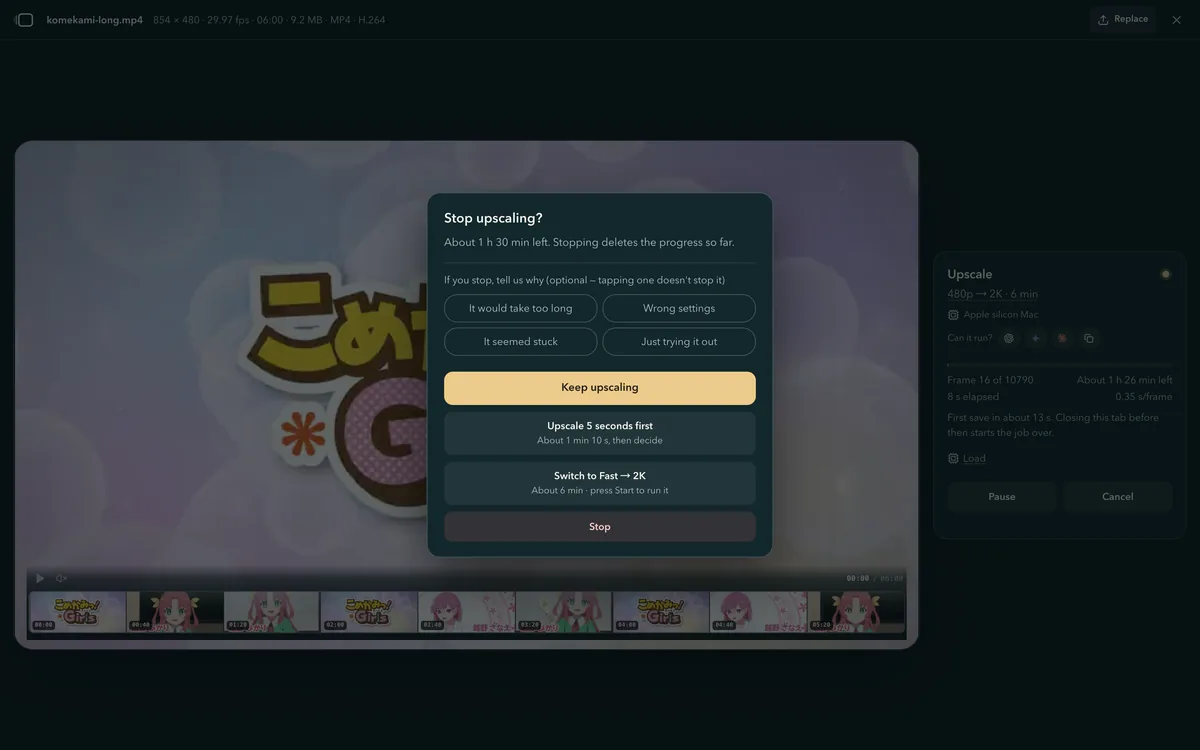
Cancel deletes what a job has done, so on a long job the panel now asks first. It shows the time left and offers two shorter ways: upscale a few seconds to see the result, or switch to a quicker setting. You can also carry on, or stop and say why if you like.
Also in this version
The panel shows what runs here
Sizes and quality tiers show only when this device can run them on this clip. With one tier left, the time under Start names it. In Firefox on Windows the panel says up front that Pro and Ultra run in Chrome or Edge on the same computer, and gives you the link to copy.
More H.264 videos open as they are
Chrome and Safari open more H.264 files without a conversion, among them 4K at 120 fps in Safari and files whose settings an app wrote down in an uncommon way. On an iPhone the page first copies such a video into a new MP4, picture untouched.
Room checked before you press Start
When the browser has too little room for the size you picked, the panel says so before Start, with the largest size that fits and a button that starts it. In a private window it says to open a normal tab.
A moved video comes back by itself
If your video was moved or renamed, or its drive went away, the panel asks you to choose it again, and Start returns once the file is where it was.
A quick page on Android
While a video upscales on an Android phone, the page answers a tap right away.
H.264 larger than 4K in Safari
When Safari or an iPhone can't decode one, the panel suggests exporting it again as an MP4 at 4K or below, or a browser on the same computer that opens it.
How 4K Video Upscaler upscales video without a graphics card
From version 2026.11.05, 4K Video Upscaler carries the upscaler's networks on the processor where the browser offers no graphics chip: hand-written WebAssembly SIMD kernels, run in background threads of the page, and nothing is uploaded.
On the processor
row by roweach thread takes a band of the frame
A frame is cut into bands, and each thread runs its own
The networks run as WebAssembly SIMD, a few rows at a time, so a frame needs little memory. Each band reads a few rows past its edge, which lets the threads work without sharing anything: two on a phone or tablet, up to four on a computer.
At its own size
1 ×the picture comes out the size it went in
4K repair cleans the picture without enlarging it
Pro has a network that keeps the size: it folds the frame to half its width and height, works there, and adds what it finds back onto the original picture. That keeps a 4K frame within reach of a computer’s graphics chip.
To the last pixel
4 ×then a final resize fills the rest
A small clip reaches 1080p in two steps
The network enlarges the clip four times, and the page’s final resize takes it the short way left to 1080p.
Questions about this version
- Can I upscale a video without a graphics card?
- Yes, in Chrome, Edge and other Chromium browsers: where the browser offers no graphics chip, the page runs the job on the processor. It takes longer, it is free, and nothing is uploaded.
- Which quality tiers run on the processor?
- Fast, in all three strengths, on any device. Pro on computers, with its time shown first. Ultra needs a graphics chip.
- Can I improve a video that is already 4K?
- Yes, on a computer whose graphics chip supports half-precision shaders: the panel offers 4K repair, which cleans the picture at the same size. On a phone the panel says the video is already 4K.
- Can I upscale 240p or 360p video to 1080p?
- Yes. Choose the clip and press Start: the page starts it at 1080p, on Pro wherever the device can run it.
- Why is my browser not using my graphics card?
- Hardware acceleration may be off in its settings, a remote desktop may hide the graphics chip, or Chrome may have switched WebGPU off after repeated failures. In Chromium browsers the page then offers the processor.
- What happens if I cancel a long upscale?
- The panel asks first: it shows the time left and offers a short trial or a quicker setting. Stopping deletes the progress so far.